jupyter_process_manager




Table of Contents
Overview.
This is a library which helps working with many processes in a jupyter notebook in a very simple way.
Installation via pip:
pip install jupyter_process_manager
Usage examples
How to create create and start processes for jupyter_process_manager
from jupyter_process_manager import JupyterProcessManager
process_manager = JupyterProcessManager(".")  # "." - path where to store outputs of the processes

# And functions for processing
process_manager.add_function_to_processing(
    func1, *func1_args,**func1_kwargs)
process_manager.add_function_to_processing(
    func2, *func2_args,**func2_kwargs)
WARNING: Please do NOT try to use functions defined inside jupyter notebook, they won’t work.
JupyterProcessManager arguments:
str_dir_for_output: Directory where to store processes outputs
is_to_delete_previous_outputs=True: Flag If you want to delete outputs for all previous processes in the directory
Usage in Jupyter Notebook
After processes were added, you can check what is happening with them.
process_manager
Showing the JupyterProcessManager widget won’t block execution so you can run the code in other cells
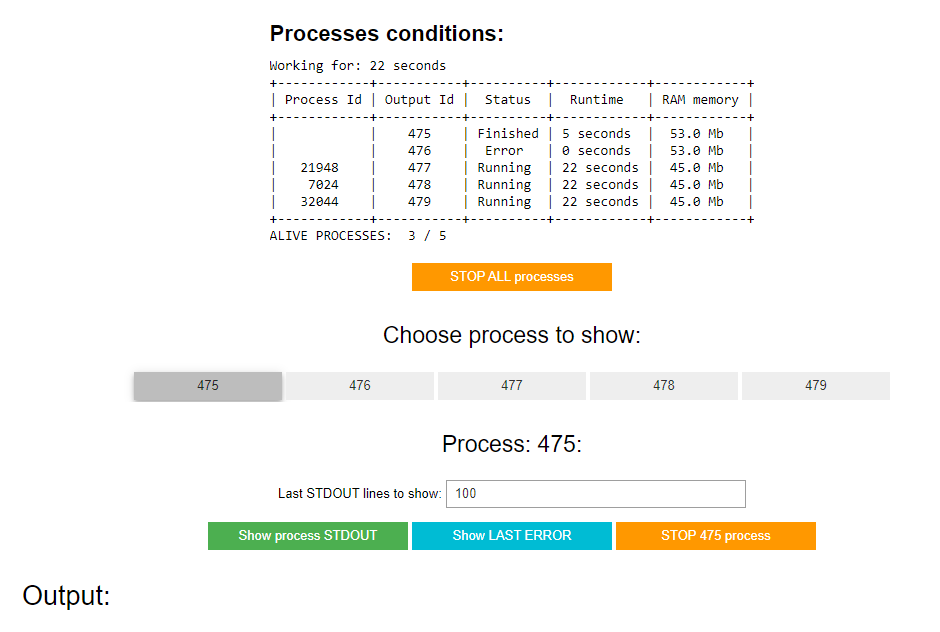
How to check output for the processes
Select the process for which you want to see the output.
Select which output you want to see.
The output will get updated every 2 seconds.
How to add more processes
You can add as many processes as you want
by running the code below in any other jupyter notebook cell
process_manager.add_function_to_processing(
    func_new, *func_new_args,**func_new_kwargs)
How to stop a process
To stop the process, select it and press the orange button to stop it
When the button to stop the selected process is pushed.
KeyboardInterrupt Exception is called for the process
If within 5 seconds process is not finished then the process will be killed.
How to do a debug run without a new process creation
# arguments are the same as in **add_function_to_processing(...)**
process_manager.debug_run_of_1_function(func_to_process, *args, **kwargs)
Other methods available within running processes for JPM
Clear stdout output from the process
from jupyter_process_manager import clear_output
clear_output()
Get stdout output for the process
from jupyter_process_manager import read_stdout
stdout_content = read_stdout()
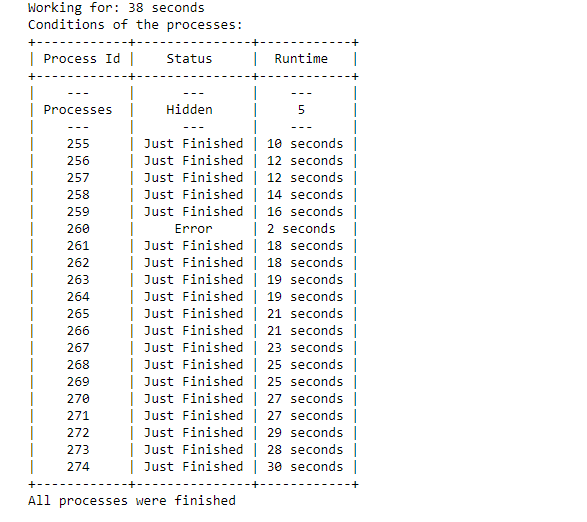
Usage in a console
process_manager.wait_till_all_processes_are_over()
You will see the output like shown below
Links
Project local Links
Contacts
License
This project is licensed under the MIT License.